
You don’t need to sign up for Etsy to complete your order. Just follow these steps to pay as a guest and download your files right away.
- Add to Cart: Click Add to Cart or Buy It Now on the artwork you want.
- Checkout as Guest: On the sign-in screen, look above the login/signup boxes and click Continue as Guest.
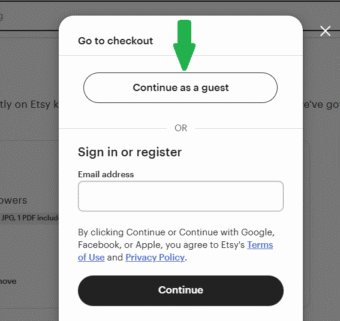
- Enter Details & Pay: Enter your name and email (Etsy will send your files here), choose a payment method, and place your order.
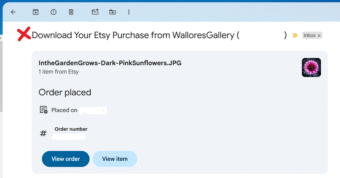
- Check Your Email: After payment, Etsy sends two emails:
- “Download Your Etsy Purchase” – this one asks you to create an account. Not this one.
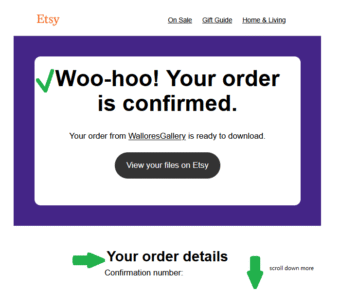
- “Your Order is Confirmed” – this is the important one.
- “Download Your Etsy Purchase” – this one asks you to create an account. Not this one.
- Download Your File: In the Your Order is Confirmed email, scroll to Your Order Detail. Click the item title (it’s a link) to instantly download the image file to your device.
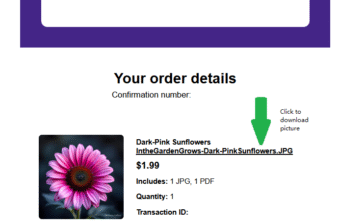
About the PDF file: If your purchase includes a PDF, Etsy only provides that through an Etsy account. The main image file can always be downloaded directly from your confirmation email without creating an account.
Quick Recap:
• Add to cart → Checkout
• Click Continue as Guest
• Pay and check your inbox
• Not this one “Download Your Etsy Purchase” email
• Open “Your Order is Confirmed” → click the item title to download